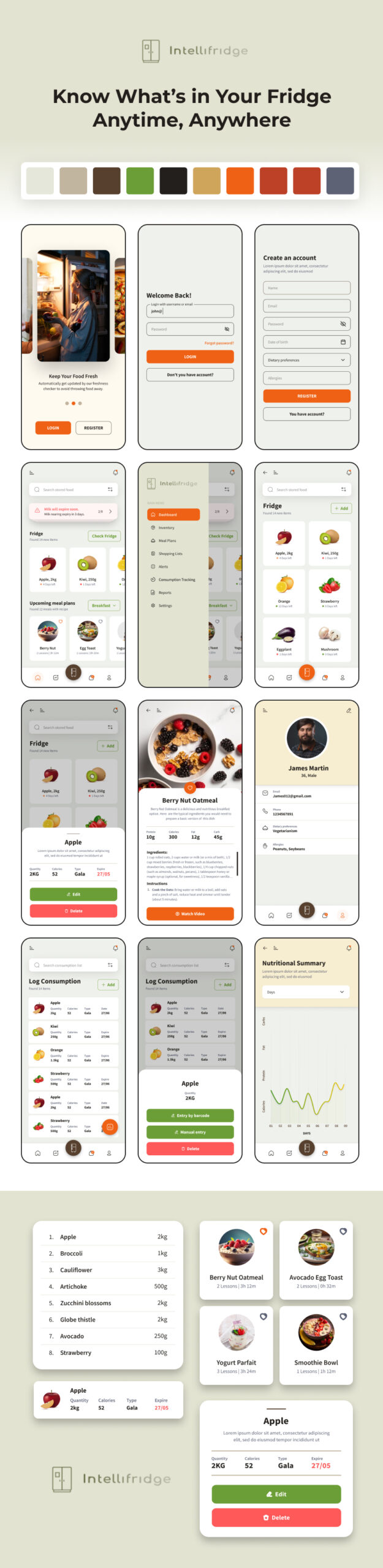
Intellifridge — Smart Food Management App
Intellifridge is a smart food inventory and meal planning application designed to help families manage food storage, reduce waste, track nutrition, and simplify grocery planning.
I worked on the complete UI/UX design of the mobile application, focusing on creating a clean, modern, and user-friendly experience for daily household food management.
The client wanted an app that could make food tracking simple, visually engaging, and easy for all family members to use. The final design successfully transformed a complex system into an intuitive mobile experience, and the client was extremely satisfied with the outcome.
My Role
Frontend Designer / UI-UX Designer
Responsibilities
- User Experience Research
- User Flow Planning
- Mobile App UI Design
- Design System & Color Palette
- Dashboard & Data Visualization Design
- Responsive Layout Thinking
- Wireframing & High-Fidelity UI
- User-Centered Design Decisions
Tools Used
- Figma
- Adobe Illustrator
- Design System Components
- Mobile UI Patterns
The Problem
Families often struggle with:
- Forgetting food expiry dates
- Wasting groceries
- Managing shopping lists
- Tracking nutrition intake
- Planning meals based on available ingredients
Most existing apps solved only one part of the problem, but the client wanted a single smart ecosystem that combines:
- Inventory management
- Meal planning
- Nutrition tracking
- Smart alerts
- Shopping management
The Goal
Design a mobile experience that:
- Helps users know what’s inside their fridge anytime
- Reduces food waste
- Simplifies grocery planning
- Tracks nutrition and consumption
- Makes the app simple for all age groups
Research & Planning
Understanding Requirements
The project included multiple system modules such as:
- Food inventory management
- Meal recommendations
- Shopping list generation
- Nutrition tracking
- Alerts & notifications
- Reports & analytics
- User profiles & dietary preferences
The challenge was designing a system that feels lightweight despite handling large amounts of information.
Design Approach
1. Clean & Minimal Interface
I used:
- Soft neutral backgrounds
- Rounded card layouts
- Clear spacing hierarchy
- Minimal icons
- High readability typography
This created a calm and modern experience suitable for daily use.
2. Smart Color System
- Warm beige backgrounds for comfort
- Green for healthy actions and food management
- Orange for primary actions
- Red for alerts and delete actions
The palette was carefully selected to create a food-friendly and modern visual identity.
3. Easy Navigation
The app structure was simplified into core sections:
- Home Dashboard
- Inventory
- Meal Plans
- Shopping Lists
- Consumption Tracking
- Reports
- Profile Settings
Bottom navigation helped users quickly switch between daily tasks.
Key Features Designed
Authentication Flow
Designed:
- Login screen
- Registration screen
- Password recovery
- User profile setup
The onboarding flow was designed to feel simple and welcoming.
Smart Fridge Inventory
Users can:
- View stored food items
- Check expiry dates
- Track quantities
- Search ingredients
- Add or remove items
The inventory cards were designed for fast scanning and easy readability.
Meal Planning Experience
I designed a recipe and meal recommendation system that:
- Suggests meals from available ingredients
- Highlights nutrition values
- Displays preparation details
- Encourages healthy eating
Recipe cards were visually rich to improve engagement.
Shopping List Management
The shopping experience included:
- Suggested grocery items
- Missing item detection
- Manual item addition
- Quantity editing
- Smart recommendations
The goal was reducing manual effort for users.
Nutrition Tracking
Users can:
- Log food consumption
- View calorie intake
- Monitor nutrition goals
- Analyze consumption history
Charts and visual summaries were designed to make data easier to understand.
Alerts & Notifications
The app provides smart alerts for:
- Low stock items
- Expiring foods
- Missing essentials
Alert designs were intentionally noticeable without feeling overwhelming.
UI Highlights
Dashboard Experience
The dashboard provides:
- Quick fridge overview
- Meal recommendations
- Alerts
- Consumption insights
Everything important is visible at a glance.
Card-Based Design System
I used reusable card components for:
- Food items
- Recipes
- Alerts
- Shopping items
- Reports
This improved visual consistency across the application.
Mobile-First Design
The UI was designed with a mobile-first approach:
- Comfortable touch targets
- Easy thumb navigation
- Minimal cognitive load
- Optimized spacing for small screens
Challenges
Complex Data Simplification
The biggest challenge was presenting large amounts of food and nutrition data without overwhelming users.
Solution
I created:
- Clean information hierarchy
- Expandable sections
- Visual grouping
- Minimal layouts
- Card-based interactions
Balancing Utility & Visual Appeal
The app needed to feel both:
- Functional like a management tool
- Friendly like a lifestyle app
The final UI successfully balanced both experiences.
Results
Final Outcome
The final product delivered:
- Modern and clean mobile UI
- Easy food inventory management
- Improved usability
- Better visual organization
- Engaging meal planning experience
Client Feedback
The client was very happy with:
- The visual quality
- User-friendly experience
- Organized system flow
- Clean and modern interface
- Attention to detail
The design helped transform a complex smart fridge management concept into a practical and intuitive mobile application.
Results
Final Outcome
The final product delivered:
- Modern and clean mobile UI
- Easy food inventory management
- Improved usability
- Better visual organization
- Engaging meal planning experience
Client Feedback
The client was very happy with:
- The visual quality
- User-friendly experience
- Organized system flow
- Clean and modern interface
- Attention to detail
The design helped transform a complex smart fridge management concept into a practical and intuitive mobile application.
What I Learned
This project helped me improve:
- UX thinking for data-heavy apps
- Mobile dashboard design
- Food & health app design patterns
- Information hierarchy
- Design system consistency
- User-centered problem solving